Maps.
Find a street in OsmAnd on your phone. Look up water points, pharmacies and hospitals that OpenStreetMap contributors have mapped.

A NEOTOPIA FOUNDATION PROJECT · TEST RELEASE v0.1.0
Give your AI agent one Markdown file. It builds an offline library for your part of Europe. During an outage, your household can still open local maps, search Wikipedia and read official preparedness guides.
Paste into your agent
Read https://raw.githubusercontent.com/neotopia-foundation/offline/v0.1.0/neotopia-offline.md and use it to build my offline drive.
Ask me the setup questions.
Show the target folder, the files, the estimated size and the tools to install.
Wait for my approval before you install anything or download the library.
At the end, help me test the drive offline.
Works with Claude Code, Codex, Gemini CLI and other agents that can run commands.
Why
The European Union asks people to be ready for at least 72 hours without outside help. National guides exist, but mostly online. In a power or network outage, they are out of reach. Neotopia Offline puts this knowledge on your disk before you need it.
Find a street in OsmAnd on your phone. Look up water points, pharmacies and hospitals that OpenStreetMap contributors have mapped.
Search Wikipedia, medical articles and repair guides in Kiwix. One laptop can share them with phones over local Wi-Fi.
National advice where it exists, first-aid references and the EU guidance on at least 72 hours of self-sufficiency.
Copy a passage from Kiwix and paste it into the chat for an explanation. The model runs on your computer and can make mistakes. For first aid, medicines and water, follow the source guide.
START-HERE.html and EMERGENCY.html in your household languages, with launchers and step-by-step runbooks.
Emergency card, family plan and local map. Paper works without power.
Each module takes extra space. The agent asks which ones you want.
Books and audiobooks. Classics from Project Gutenberg in your language and national libraries, for example Wolne Lektury in Poland with audiobooks.
Offline game. Luanti, an open sandbox game, with a saved starter world.
Lessons for children. Kolibri, an offline learning platform. You import lessons, including Khan Academy, during the build.
Video and audio. Instructional videos under open licences and the VLC player.
Translation. Text translation (Argos Translate) and speech to text (whisper.cpp) without the internet.
Radio and Meshtastic. Drivers, firmware and manuals for Meshtastic, a way to send messages over LoRa radio.
Rescue stick. Ventoy and a Linux image. Start a computer with a broken system and open the library.
Private documents. An encrypted VeraCrypt container for copies of important papers.
START-HERE
The agent writes a START-HERE.html page to the drive. It walks you through tasks for a time without the network. On the reference drive the page has three languages: Polish, Bulgarian and English. Some tasks need modules that you choose during the build.
A separate EMERGENCY.html page lists the emergency numbers. Every number links to the page of the official guide on the drive.
Claude Code, Codex, Gemini CLI or another agent that can run commands.
The agent downloads guide v0.1.0 from GitHub by itself.
The agent asks about your country, languages, devices, free space and data cap. It shows the plan: files, size and tools. It downloads only after your "yes". At the end it runs an offline test.
Prefer to check the file first? Download guide v0.1.0, compare the checksum with the GitHub release notes and point the agent to the local file.
A hosted agent sends your answers to its provider. Keep private medical details out of that chat.
plan: files, size, tools
Waiting for "yes".
Measured on the reference drive. Extension modules (video, books, audiobooks, games) come on top.
Sizes
| Drive | Typical contents |
|---|---|
32 GB |
Apps, a small AI model, medical and practical encyclopedias, short Wikipedia, phone maps, guides. Target: 25 GB |
128 GB |
Plus a larger AI model, full Wikipedia without images, repair libraries, terrain, addresses |
256 GB |
Plus science textbooks, neighbour-country maps, books and audiobooks |
512 GB and more |
Plus Wikipedia with images, large book collections, several countries |
Plan to leave 10% of the drive free. The agent picks the AI model by the memory of your computer.
Coverage
EU-27, EEA and EFTA, the United Kingdom, the Western Balkans, Ukraine, Moldova, Turkey and the South Caucasus. Available guides and Wikipedia editions differ by country and language.
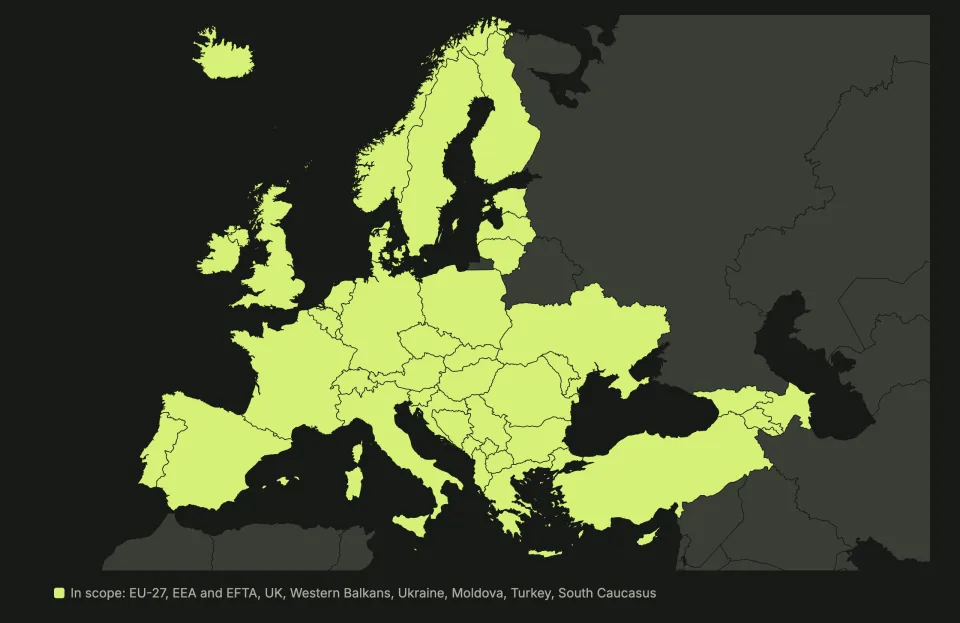
The drive works offline after that.
On Windows, the agent needs a Bash environment such as WSL. We have not tested a Windows build yet.
exFAT works on macOS, Windows and Linux.
Download time depends on your connection. A full checksum pass over 114 GB took about one hour on a USB 3 drive.
The drive, data charges and the fees of your AI agent, if any. The guide itself is free.
You need no Neotopia account. The guide sends nothing to the foundation.
The manifest lists every source. Most files come from their publishers: Kiwix, OpenStreetMap, Hugging Face and official government sites.
The agent checks files against the publishers' checksums where they exist. At the end it writes SHA256SUMS.txt for the whole drive.
With aria2c installed, Kiwix archives of 1 GB or more go over BitTorrent. This spares the free Kiwix mirrors.
The guide is free. You pay for the drive, data charges and your AI agent if you use a paid one.
No. You need an AI agent that runs in a terminal. If you do not have one, ask someone who does.
No. The chat does not read the library. It explains a passage that you copy from it. It can be wrong. Base health decisions on the guides on the drive.
The agent needs a Bash environment such as WSL. We have not tested a Windows build yet. You can open the finished drive on macOS, Windows, Linux and Android.
Downloaded material keeps its own licence. Before you copy a drive for other people, check each item and leave personal files out. If the terms are unclear, share a link or ask the publisher.
It depends on your connection and the size. You can stop and resume. The agent continues where it stopped.
NEOTOPIA is a Polish foundation for a good future. It connects research with practical action, tests solutions and shares what it learns. Neotopia Offline is one of its projects. More at neotopia.foundation.
From Lastbook (Immortal Protocols, MIT licence), a desktop app for the United States. Neotopia Offline is an independent foundation project for Europe. It is not an official Lastbook edition.
Build reports help most, with the real size and the offline test results. New national guides and broken links come next.
Send a build report on GitHubCopy the prompt from the top of the page and paste it into your AI agent. It walks you through the build step by step. Get ready for a time without the network.